
Practical AI video guidance
AI Video Duration: Hold, Slow Down, Loop, or Add a Shot?
Fit a short AI video to a 12-second delivery with tested FFmpeg commands, downloadable hold and slow-play exports, audio decisions and a frame-count checklist.
Updated
Create with VidVidTo make a short AI video fit a longer delivery, first decide whether you need more screen time or more action. A held final frame, slower playback or a loop can fill time using existing pictures. A new event needs another shot or a generated continuation, followed by a continuity review.
This guide demonstrates two local edits of one public VidVid clip: 12 seconds with a final-frame hold and 12 seconds with slower playback. Both downloadable exports were checked with FFmpeg 8.0.1 on November 1, 2026. These are editing operations on your computer; this guide does not describe an extension control in the VidVid generator.
Choose the operation before spending more credits
| Delivery need | First operation to consider | Reject it when |
|---|---|---|
| Leave a finished product or title on screen | Hold an approved frame, then add your text in an editor | The final image has defects, or continuing movement is required |
| Give an existing movement more screen time | Retime the usable action | Slower movement looks wrong, or speech must keep its original timing |
| Repeat a genuinely cyclic motion | Build and review a loop | End and start differ visibly, or a repeated event would mislead the viewer |
| Show a new action or reveal | Add a planned shot or generate a continuation | You only need reading time and already have a usable still |
| Meet an exact delivery length | Set a timeline target, export, then inspect the file | You are relying only on the generator’s nominal duration |
Our example starts with a dancer in a warm studio and ends with a pale statue-like dancer against a dark background. The sampled start and end are visibly different. We would not choose a seamless loop from these endpoints. A continuation would also need a clear next action; merely requesting “longer” leaves that decision unresolved.
For a multi-shot project, use the storyboard workflow to allocate the missing time before generating anything else. Do not extend a defective shot just to meet a number.
The measured source and three real exports
Download the original clip, held-frame export, silent retimed export, audio-retimed export, and the video-only audit plus audio-retime audit.
| File | Video duration | Decoded video frames | Frame rate | Dimensions | Audio stream |
|---|---|---|---|---|---|
| Original | 5.166667 s | 124 | 24 fps | 1344 × 768 | Present |
| Final-frame hold | 12.000000 s | 288 | 24 fps | 1344 × 768 | Absent |
| Slower playback | 12.000000 s | 288 | 24 fps | 1344 × 768 | Absent |
The original container reports 5.167000 seconds; the table uses its video stream duration. At 24 fps, a 12-second target needs 288 frames. The held version adds 164 frames, or about 6.833 seconds. The slower version spreads the same source action over the target time. Neither export contains a newly generated action.
These measurements establish file properties. We also inspected six extracted pictures from each export; we did not complete a full playback or listening review. The files are method examples, not an approved client delivery or a model-quality comparison.
Option 1: hold the final frame
Put the original file in an empty working folder. With FFmpeg installed, run:
ffmpeg -hide_banner -loglevel error -n \
  -i minimax-h3-card-A.mp4 \
  -map 0:v:0 -an \
  -vf 'setpts=PTS-STARTPTS,tpad=stop_mode=clone:stop=164' \
  -c:v libx264 -crf 18 -pix_fmt yuv420p -movflags +faststart \
  minimax-h3-card-A-hold-12s.mp4
This command is sized for this 124-frame, 24 fps input. The FFmpeg filter reference documents tpad cloning the ending frame and setpts changing timestamps. -n avoids overwriting an existing output; -an deliberately removes audio.
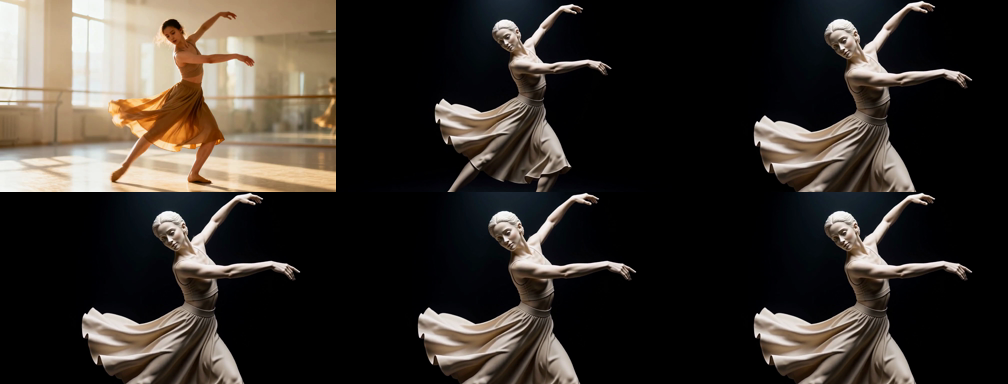
Read left to right, then the next row. The samples are at 0, 3, 5.125, 6.833, 10 and 11.958 seconds. The ending pose remains in place across the later samples. That can provide reading time, but a nearly seven-second stop is a conspicuous creative choice.
Inspect the held picture at full size before adding a headline or CTA. A malformed hand or product label remains visible for the whole hold. If the last frame is unsuitable, select another approved frame in your editor and recalculate the timeline; this command does not search for a better frame.
Option 2: slow the action to fit
ffmpeg -hide_banner -loglevel error -n \
  -i minimax-h3-card-A.mp4 \
  -map 0:v:0 -an \
  -vf 'setpts=(PTS-STARTPTS)*72/31,fps=24,tpad=stop_mode=clone:stop=-1,trim=end_frame=288' \
  -c:v libx264 -crf 18 -pix_fmt yuv420p -movflags +faststart \
  minimax-h3-card-A-retime-12s.mp4
The timeline multiplier is 288/124 = 72/31; playback speed is about 0.431 of the original. The fps filter duplicates or drops frames rather than inventing intermediate motion. Padding followed by the 288-frame trim makes the frame budget explicit even at the rounded endpoint. This is not optical-flow interpolation.
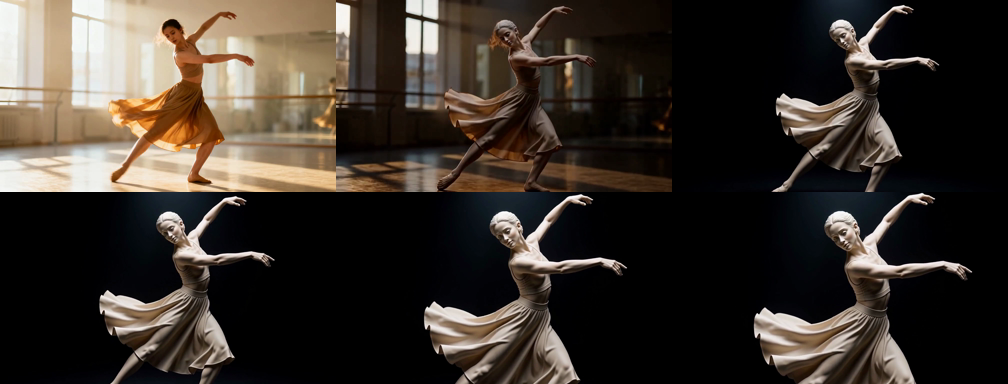
The sample times match the held version. At three seconds this version is still showing an earlier part of the transformation, while the held version has already reached the dark-background scene. That is evidence of a timing change, not improved motion quality. Normal-speed playback is still needed to judge cadence, judder and whether the movement serves the brief.
For another constant-rate source, first measure its frame count and target frame rate. Do not reuse 164 padding frames or the 72/31 multiplier blindly. For variable-rate input, use timestamps and a defined output timeline; average frame rate alone is insufficient.
Make an explicit audio decision
Both commands use -an. The original has audio, and the two exports have none. This avoids presenting an unchanged soundtrack as if it had been synchronized to slower pictures, but it does not solve your sound design.
- For a held ending, decide whether ambience, music, silence or a fade should cover the added time. Verify the resulting audio and video endpoints after export.
- For speech or synchronized action, review lip movement and sound together. Slowing only the picture changes their relationship; stretching sound needs a separate intelligibility and sync review.
- If the words and action must retain their timing, adding another shot or a designed end card may serve the brief better than slowing the whole clip.
Do not infer silence from a missing waveform preview or assume that an audio stream contains useful sound. File inspection and listening answer different questions.
A third export keeps the source soundtrack and retimes it with the picture. The source has 124 video frames at 24 fps; the 288-frame, 12-second target stretches the video timeline by 72/31. The audio tempo is the inverse, 31/72 (about 0.431×), split into two valid atempo=0.656167322834318 stages. This changes the sound’s timing too; it is not a way to preserve the original dialogue pace.
ffmpeg -hide_banner -loglevel error -n \
  -i minimax-h3-card-A.mp4 \
  -filter_complex "[0:v]setpts=(PTS-STARTPTS)*72/31,fps=24,tpad=stop_mode=clone:stop=-1,trim=end_frame=288[v];[0:a]atempo=0.656167322834318,atempo=0.656167322834318,atrim=duration=12,asetpts=PTS-STARTPTS[a]" \
  -map "[v]" -map "[a]" -t 12 \
  -c:v libx264 -crf 18 -pix_fmt yuv420p \
  -c:a aac -b:a 128k -movflags +faststart \
  minimax-h3-card-A-retime-12s-audio.mp4
Download the audio-retimed export and its ffprobe audit with the exact command and SHA-256. Both streams report 12.000000 seconds; ffprobe does not establish perceptual sync or sound quality. This file has not been fully played or listened to, so check dialogue intelligibility, lip sync, pacing, and the ending before delivery. For dialogue that must keep its original timing, remove or replace the source audio, or use another edit instead of simply slowing both streams.
Verify the delivery rather than trusting the filename
Run this separately for each output:
ffprobe -v error -count_frames \
  -show_entries stream=index,codec_type,width,height,avg_frame_rate,duration,nb_read_frames:format=duration \
  -of json minimax-h3-card-A-hold-12s.mp4
The tested held file reports 288 decoded video frames at 24 fps and 12.000000 seconds, with no audio stream. Repeat with the retimed filename. Check the actual files you will deliver, not just the original or an editor’s timeline display.
Use this handoff record:
Source filename + SHA-256:
Required action / reading time:
Target duration + frame rate + frame budget:
Operation and reason:
Audio decision:
Measured output properties:
Playback / sync / ending review:
Accept, revise or replace:
Before acceptance, watch the whole export, listen if sound is expected, and inspect the hold or join at normal speed. Check title readability, intentional movement and the final delivery dimensions. Our command success and sampled frames do not replace that review. The metadata guide covers file checks; the contact-sheet guide helps locate pictures for closer inspection.
When another shot is the right answer
If the brief requires the dancer to pick up a prop after the existing action, neither a held frame nor slower playback supplies that event. Write the next shot’s start state, action, end state and acceptance condition. Then choose a workflow available in the product you are using and review the boundary between clips.
This guide has not tested a continuation model or compared providers. It shows a narrower, reproducible result: two ways to allocate 12 seconds from an existing clip, the pictures those choices preserve, and the audio and review work still required.
What do you need to solve next?
Continue preparing inputs, fixing visual problems, or checking a video before delivery.
Plan an AI Video Storyboard Before Generating Clips
Plan AI video shots and replace one clip with a worked timing example, adjacent-cut review and caption, audio and version checks.
Check an AI Video File Before Editing or Delivery
Inspect AI video resolution, FPS, duration and audio with ffprobe. Compare a real original and edited export, with downloadable files, hashes and a diagnosis workflow.
Extract AI Video Frames and Build a Review Contact Sheet
Make an AI video contact sheet with tested FFmpeg commands, real frame timestamps and a downloadable sample. Inspect adjacent frames before editing or delivery.